
Creating an online presence is one of the most important steps for any business in today’s digital world. Customers often search online before choosing a product or service, and social media platforms play a major role in this process. Among all platforms, Facebook remains one of the most widely used networks for businesses to connect with their audience.
If you are new to online marketing, learning how to create a Facebook Business Page is a simple and effective way to start. A Facebook Business Page allows businesses to share information, communicate with customers, and build trust without needing advanced technical knowledge or a large budget.
This guide explains how to create a Facebook Business Page in a clear, step-by-step manner. The information is written for beginners and follows best practices suitable for long-term use and AdSense approval.
What Is a Facebook Business Page?
A Facebook Business Page is a public profile designed specifically for businesses, brands, and organizations. Unlike personal profiles, Business Pages are meant for professional use and allow companies to interact with customers openly.
A Business Page can be used to:
- Share official business updates
- Provide contact and location details
- Communicate with customers through messages
- Display reviews and feedback
- Build an online reputation
Understanding how to create a Facebook Business Page helps businesses establish a professional identity online.
Why Businesses Should Create a Facebook Business Page
Many customers expect businesses to have an online presence. A Facebook Business Page helps meet this expectation and offers several advantages.
Benefits include:
- Improved visibility on social media
- Easy communication with customers
- Increased brand credibility
- Support for digital marketing efforts
- Access to business insights
For small and local businesses, a Facebook Page often acts as a primary online touchpoint.
Requirements Before Creating a Facebook Business Page
Before starting the process of how to create a Facebook Business Page, make sure you have the following:
- A personal Facebook account (required for page management)
- A business name
- A relevant business category
- A short business description
- A logo or representative image
Your personal profile information will remain private and will not be visible to visitors.
How to Create a Facebook Business Page Step by Step
Step 1: Log In to Your Facebook Account
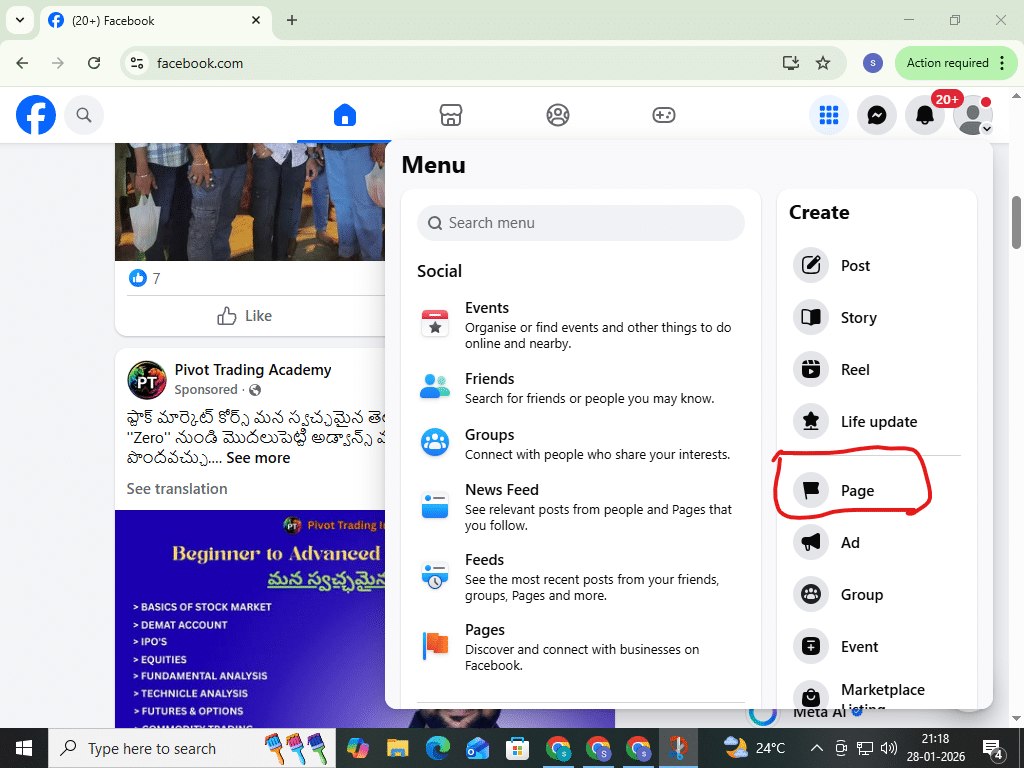
Log in to your personal Facebook account. From the main menu, select Pages and then choose Create New Page. This opens the Page creation interface.
Step 2: Add Basic Business Information
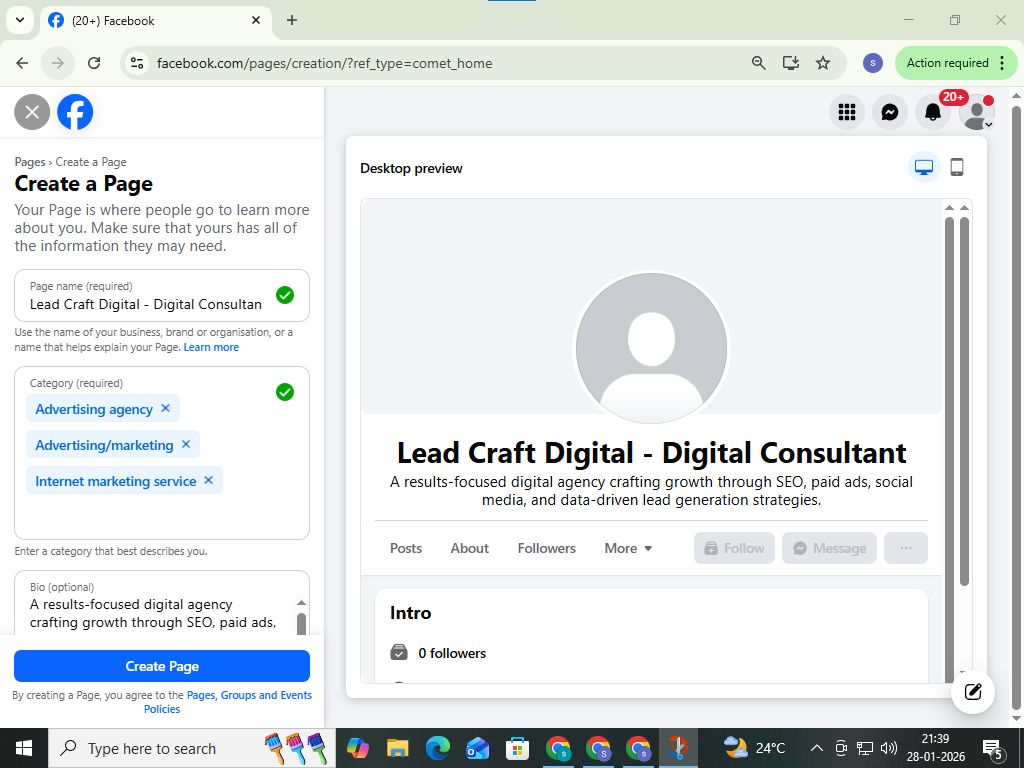
Enter your business name, select up to three categories that describe your business, and write a short description explaining what your business offers.
This information helps Facebook understand your Page and show it to relevant users.
After completing these details, click Create Page.
Step 3: Upload Profile and Cover Photos
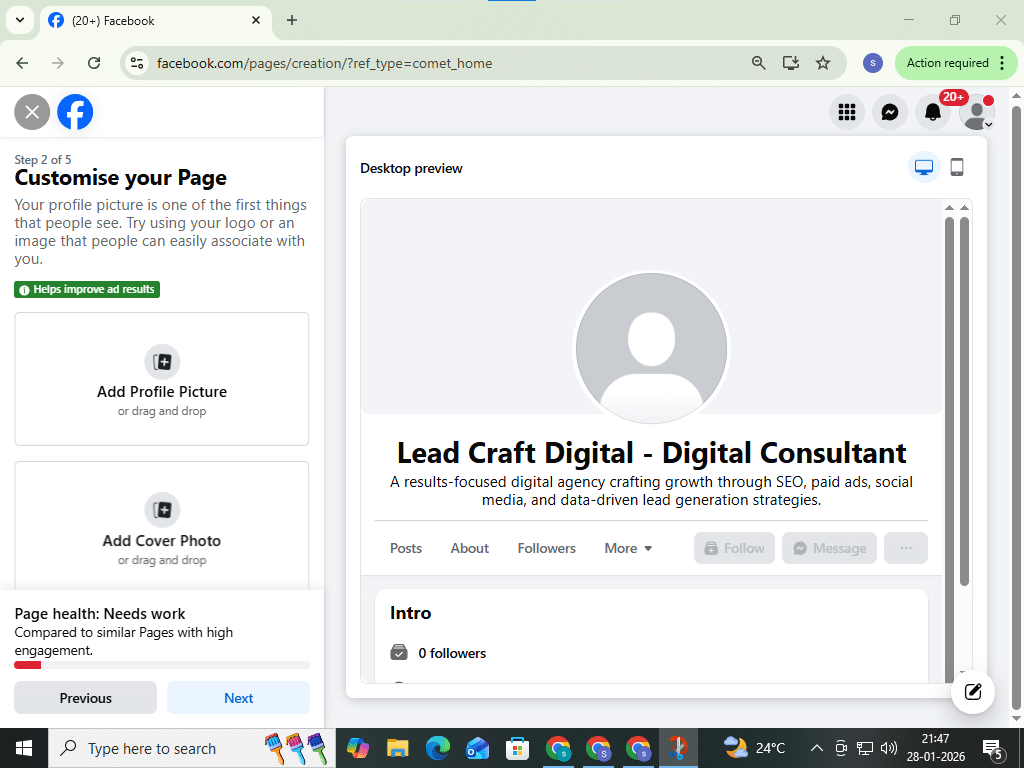
Images help create a professional first impression.
- Profile photo: Recommended size is 170 × 170 pixels. Most businesses use their logo.
- Cover photo: Recommended size is 1640 × 856 pixels. This image should reflect your business purpose or brand identity.
Use clear, high-quality images that represent your business accurately.
Step 4: Complete Your Business Details
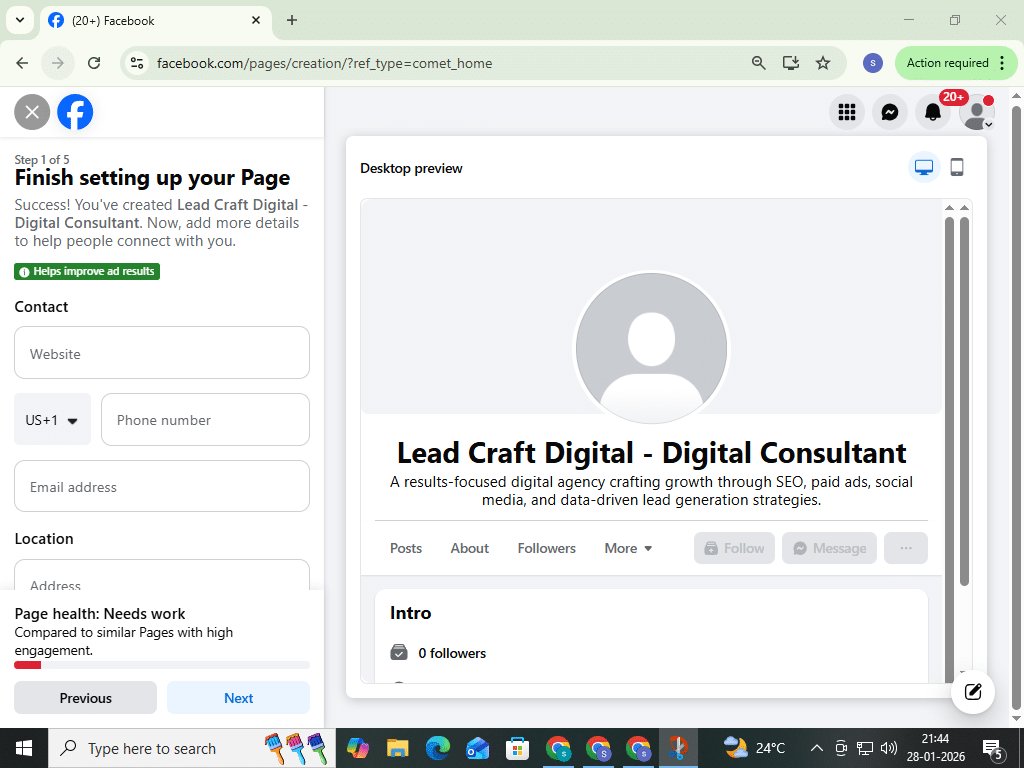
A complete Page builds trust. Add important details such as:
- Business address
- Phone number or email
- Website (if available)
- Business hours
You can add this information from the Page management section under setup options.
Step 5: Add a Call-to-Action Button
A call-to-action button guides visitors on what to do next. Common options include:
- Contact Us
- Send Message
- Learn More
Choose the option that best matches your business goals.
Step 6: Set a Custom Page Username
A custom username creates a simple and professional Page URL. This makes your Page easier to find and share.
Keep the username short and related to your business name.
Step 7: Publish an Initial Post
Before inviting people to your Page, publish at least one post. This could be a welcome message or a short introduction to your business. An active Page appears more trustworthy to visitors.
Step 8: Invite People to Follow Your Page
You can invite friends, share the Page link on other platforms, or add it to your website. Over time, consistent posting and interaction help grow your audience naturally.
Best Practices for Long-Term Page Quality
To maintain a professional and trustworthy Page:
- Post helpful and original content
- Respond politely to comments and messages
- Keep business information updated
- Avoid misleading or exaggerated claims
These practices support user trust and platform compliance.
Common Mistakes to Avoid
When learning how to create a Facebook Business Page, avoid:
- Leaving your Page incomplete
- Using unclear or low-quality images
- Copying content from other websites
- Posting misleading promotions
Original and helpful content is essential for long-term success.
Table of Contents
Conclusion
Learning how to create a Facebook Business Page is an important step for businesses looking to establish an online presence. The process is simple, free, and accessible to beginners. A well-maintained Facebook Business Page helps businesses share information, communicate with customers, and build credibility over time.
By following the steps in this guide and focusing on clear, honest, and useful content, you can create a Facebook Business Page that supports your business goals and meets Google AdSense quality standards.
Frequently Asked Questions (FAQs) – How to Create a Facebook Business Page
1. How to create a Facebook Business Page step by step?
To understand how to create a Facebook Business Page, first log in to your personal Facebook account. From the menu, click on “Pages” and select “Create New Page.” Enter your business name, choose relevant categories, and add a short description. After creating the Page, upload a profile photo and cover image, complete your business information, set a username, and add a call-to-action button. Following these steps correctly ensures your Facebook Business Page looks professional and is ready to attract customers.
2. Is it free to create a Facebook Business Page?
Yes, learning how to create a Facebook Business Page does not require any payment. Facebook allows businesses to create and manage Pages for free. You only need to spend money if you want to run Facebook ads or boost posts. Even without paid promotions, a Facebook Business Page can help you share updates, interact with customers, and grow your brand organically.
3. Do I need a personal account to create a Facebook Business Page?
Yes, a personal Facebook account is mandatory if you want to know how to create a Facebook Business Page. Facebook uses personal accounts to manage Page ownership and admin roles. However, your personal profile information will not be visible to visitors. This setup helps keep Business Pages secure while allowing multiple admins to manage them efficiently.
4. Can I create multiple Facebook Business Pages from one account?
Absolutely. Once you understand how to create a Facebook Business Page, you can create and manage multiple Pages using a single personal account. This is useful for business owners with multiple brands or digital marketers managing client Pages. Each Page can have its own settings, content strategy, and audience.
5. What information is required to create a Facebook Business Page?
To properly follow the process of how to create a Facebook Business Page, you need basic details such as your business name, category, short bio, profile photo, cover photo, contact information, and business hours. Completing all available fields improves credibility and helps customers find and trust your business easily.
6. Why is creating a Facebook Business Page important for businesses?
Understanding how to create a Facebook Business Page is important because it helps businesses build online visibility, connect with customers, and promote services effectively. A Business Page allows direct communication through messages and comments, increases brand trust, and supports digital marketing efforts without needing a full website.
7. How long does it take to create a Facebook Business Page?
If you follow the correct steps on how to create a Facebook Business Page, the setup usually takes only 10–15 minutes. Uploading images, adding business details, and setting a username may take a little extra time, but the overall process is quick and beginner-friendly.
8. Can a Facebook Business Page appear on Google search results?
Yes, when done correctly, learning how to create a Facebook Business Page can also help your business appear in Google search results. Optimizing your Page with complete information, keywords, and regular posts increases the chances of visibility both on Facebook and search engines.